
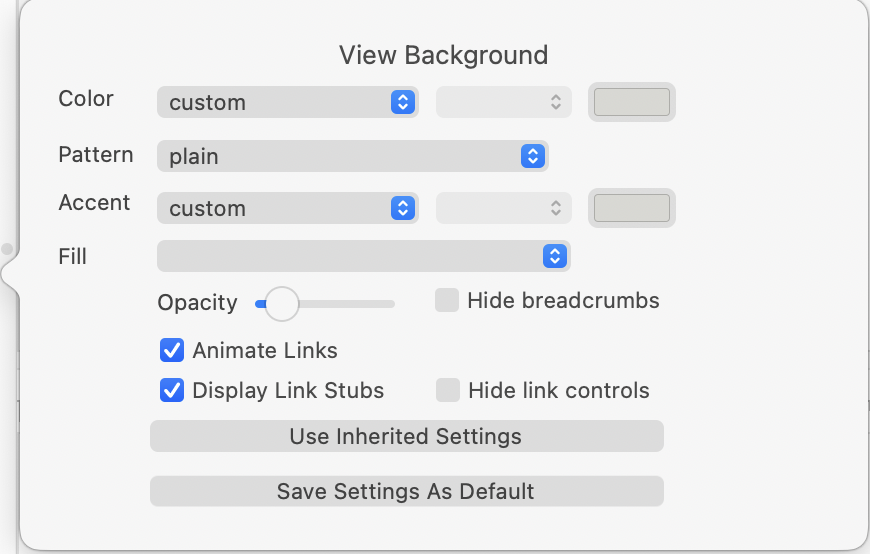
This pop-over aids customisation of main pane backgrounds. Used by Outline, Chart, Map, and Treemap views. Controls are (some are used only in Map view—revised for v11.7.0):
- Color. A standard trio of colour controls allow setting of $MapBackgroundColor. This forms the main background colour of views in the view pane.
- Pattern. A list of static patterns is used to set $MapBackgroundPattern.
- Color. A standard trio of colour controls allow setting of $MapBackgroundAccentColor. This is used as the accent colour in the background if a pattern is set.
- Fill. A texture list allows setting of $MapBackgroundFill, using a fill texture instead of a pattern or plain background.
- Opacity. Sets the fill opacity ($MapBackgroundFillOpacity).
- Hide breadcrumbs. Toggles view's breadcrumb bar (default: un-ticked).
- [Shown in Map view only]:
- Display Link Stubs. Toggles the visibility of link stubs (default: ticked).
- Animate Links. Toggles link animation of outbound links of the selected note(s) (default: ticked).
- Hide link controls. Toggles the visibility of link configuration controls (default: un-ticked).
- Use Inherited settings. Restore the current background to document default settings.
- Save Settings As Default. This does the reverse of the above and uses the current background settings to set them as the document default settings.
See also—notes linking to here: