
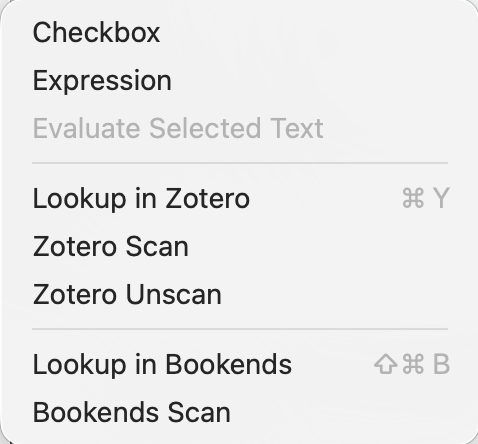
This sub-menu of the Edit menu, contains the following items:
- Checkbox. Inserts a check-box into $Text. See more.
- Expression. Inserts an action code expression into $Text. See more.
- Evaluate Text Selection. Replaces the $Text selection with its action-code-evaluated result. See more.
- [rule]
- Lookup in Zotero (⌘+Y). From v11.5.0, the selected text will be used to search the linked Zotero Library. A list of matches will appear in a popup window; click on the chosen item to replace the text with a citation marker of the form
[Bush 1945 #QRS456TU]. If no text was selected, the word containing the insertion pointer is selected. Cancelling or closing the pop-over leaves the text unchanged. - Zotero Scan. From v11.5.0, this will scan the current note and replace citation markers with citations, using the format of the current Zotero citation style (set in Document Settings:Accounts). The default style is "apa", the American Psychological Association style. Other common styles include "mla", "chicago-note-bibliography", and "association-for-computing-machinery". Additional styles can be downloaded into Zotero using the app or website. After performing a Zotero Scan, the clipboard will contain a bibliography, which can be paste in the current note or elsewhere. This is done in the background, and might take a while if many citations are retrieved.
- Zotero Unscan. From v11.5.0, this will replace citations with the Zotero citation markers. Tinderbox maintains a dictionary of citation markers and citation in the note's $Citations attribute.
- [rule]
- Look up in Bookends. From v11.5.0, the selected text will be used to search Bookends. This uses Bookends installed on the current Mac and will open it (and its last used database) if closed. A list of matches will appear in a popup window; click on the chosen item to replace the text with a citation marker of the form
[Anderson 2025 #248535], where the number is the Bookends 'item ID' or internal GUID (as opposed to a citekey for the record) If no text was selected, the word containing the insertion pointer is selected, if the cursor is on in a word a blank look-up is offered into which the user can type a search string. Cancelling or closing the pop-over leaves the text unchanged. Bernstein. In the picker, items are sorted alphabetically by author name, and then in descending order by year. - Bookends Scan. From v11.5.0, this will scan the current note and insert, after any citation markers a formatted reference string, using the format currently selected in Bookends.
Note: be aware these are experimental features.
See also—notes linking to here: