
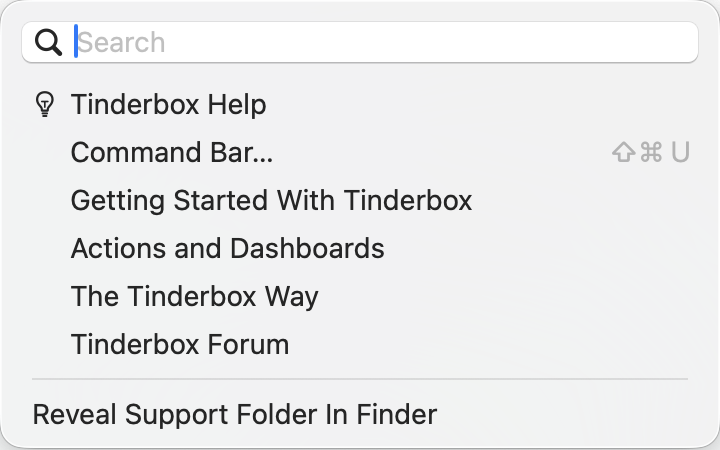
The Help menu contains the following items:
- Search. Search box gives access to simple Apple Help match listing. When a value is typed here the matches are shown beneath replacing existing menu items. Clear the search box to re-show default menu items.
- Tinderbox Help. This opens the Tinderbox Help window. Release notes are included within Help.
- Command Bar (⇧⌘U) (from v11.7.0) this renames the previous Commands & Info… caption. Opens the document window's Command Bar.
- Getting Started WithTinderbox. Opens a PDF (stored inside the Tinderbox program) which explains Tinderbox to new users.
- Actions and Dashboards. Opens a PDF (stored inside the Tinderbox program) which explains use Tinderbox actions and construction of dashboards. There is an associated TBX files available here.
- The Tinderbox Way. A web link to a page describing a book about using Tinderbox by its chief architect and coder, Mark Bernstein.
- Tinderbox Forum. A web link to the online user-to-user Tinderbox Forum. Note the forum is user-to-user discussion & help and is not formal Eastgate support. Urgent/vital support issues or crash reports should always be emailed to Eastgate support.
- [rule]
- Reveal Support Folder in Finder. If clicked, a Finder window opens on the application support folder for Tinderbox (at
~/Library/Application Support/Tinderbox), giving access to various user configuration features.
Apple Help match listing:
See also—notes linking to here:
- Tinderbox Documentation And Other Resources
- The Tinderbox Manual
- Migrating Tinderbox to a new computer
- Main menu bar
- Treemap view
- Release Notes
- favorites folder
- Tinderbox Application Support folders
- Markdown folder
- config folder
- backups folder
- badges folder
- color schemes folder
- fill folder
- Command Bar
- Command Bar sources