
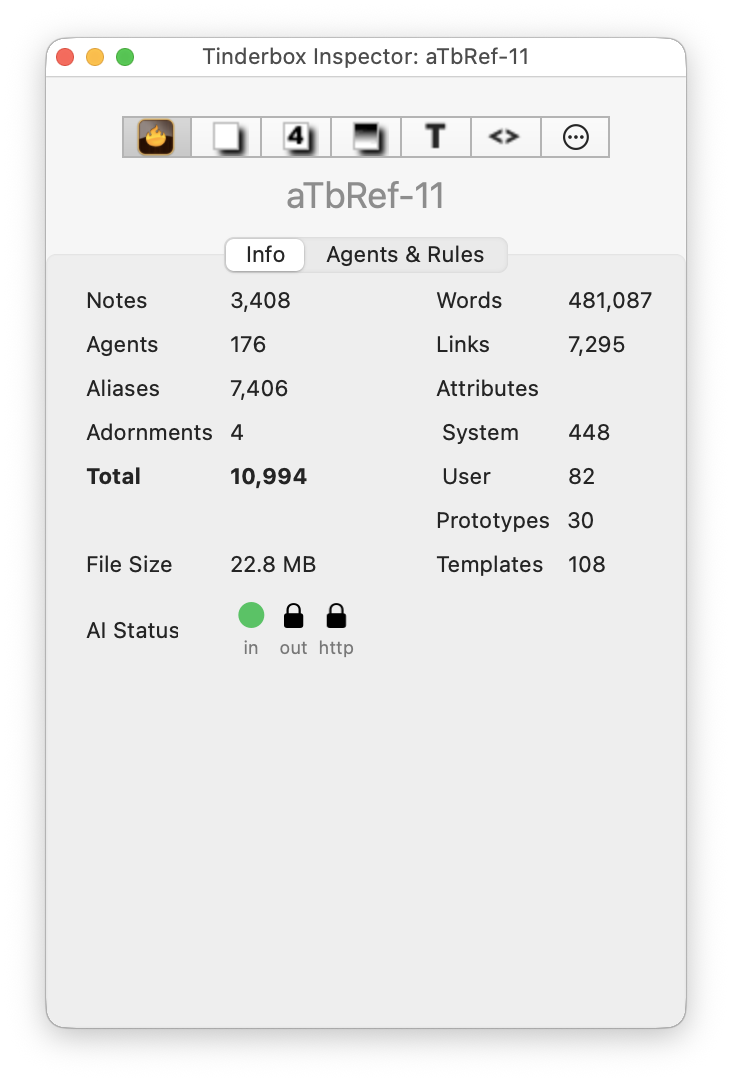
The Hypertext Status view gives an overview of the current documents contents. It lists:
- Notes. The number of notes in the current document (containers count as notes, as do separators).
- Agents. The number of agents in the current document.
- Aliases. The number of aliases in the current document.
- Adornments. The number of adornments in the current document.
- Total. Sum of notes, agents, aliases and adornments.
- File Size. The approximate (saved) size of the current Tinderbox TBX file.
- AI Status. (From v11.7.0) see below.
- Words. The total word count for all notes.
- Links. The number of links in the current document (excluding 'prototype' type links).
- Attributes. The number of attributes defined in the current document:
- System. The number of System (built-in) attributes. Hidden System attributes are not counted since the user cannot see them.
- User. The number of user-defined attributes.
- Prototypes. The number of prototypes defined in the current document.
- Templates. The number of export templates defined in the current document.
AI Status
From v11.7.0, the AI Status indicationreflects the status of the AI MCP connection. There are a number of icons:
- The in icon reflects AI calling Tinderbox
- The out icon Tinderbox calling back to the to the AI.
- From v11.8.0, the http icon is used for experimental MCP status use (still under developement)
Possible states include disabled (grey), active (green), disconnected (red) or disabled in this TBX (lock symbol, for out only). This status indicator is intended to help diagnose issues when connecting to AI clients as an issue might occur at either/both sides of the connection. Also note:
- If multiple AI MCPs are in use a red indicator will indicate one or more MCPs are malfunctioning.
- If MCP is allowed by Tinderbox ▸ Enable AI Integration but disallowed in the current document, the Tinderbox Inspector’s MCP status shows a lock icon for "output". This more accurately reflects the situation: MCP is allowed but won’t disclose information about this document.
See also—notes linking to here: